A blog about music and web programming


Sunbeams Through Stained Glass

February 3rd, 2010

Another piece for Jun Kang.

Download “Sunbeams Through Stained Glass”

Easy Convolution with Sound Hack.

January 29th, 2010

SoundHack, a freeware program by Tom Erbe, has some terrific and unique functionality for manipulating sound - including convolution.

Convolution, a type of analysis-based sound file manipulation often used for reverb, can be used to generate some extremely interesting sounds by “cross-breeding” two source sound files. This can be done programatically with a number of music programming languages like CSound and Max/MSP, but SoundHack makes it quite easy (and free).
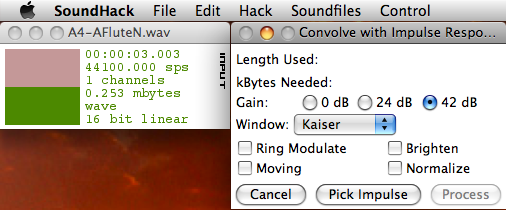
Screenshot of SoundHack's convolution dialog box.

An Example:

Here I’ve taken an alto flute sample:

And convolved it with a female voice sample (courtesy of the freesound project and digifish music):

To produce:

This technique of convolution was used heavily - actually for every sound in the piece - for the piece Sunbeams Through Stained Glass.

Logic Express 8 tips and tricks for getting started

November 12th, 2009

Recently switched to Logic Express 8 as my editor and, while in general I’ve found it to be fairly intuitive, I’ve had to search a bit to discover how to do some things. So I’m compiling this list, which I hope will be useful to others, of tips and tricks for getting started using the program.

  • How to get the playhead to snap to a barline/beat:
    In the ruler bar, click near the barline/beat and hold the mouse button down. The playhead will automatically snap to the nearest division as defined by the snap settings.
  • How to get dragged regions or midi events to snap to a barline/beat, not to the position relative to the barline/beat:
    In the “snap” drop-down menu choose “snap to absolute value”
  • How to get more than two insert slots for a track:
    Just fill up the first two slots and a third will appear, with more slots becoming available as they’re needed.
  • Navigating between markers
    Control + Command + Arrow (left or right) will jump to the previous (left arrow) or next (right arrow) marker in the project
  • How to jump to a specific marker
    Command + /, then enter the number of the marker in the dialog box which appears
  • How to auto-zoom-in or out
    Command + Left Arrow (zoom out) or Command + Right Arrow (zoom in)
  • Rename an audio or midi region
    Select ‘Text Tool’ from the ‘Left-Click Tool’ or ‘Command-Click Tool’ menus (top right of the arrange window). Then just click (or Command-Click) the region
  • How to alter the velocity of a midi note in the piano roll
    There’s a velocity tool available from the drop-down menus in the top right of the piano roll interface (square with a ‘v’ inside it). Using this tool you can drag up or down to change the velocity of the note. The program helpfully plays the note repeatedly as you change it to give you a sense of the impact of your change.

Shimmer Pairs

October 12th, 2009

Another short piece written for director Jun Kang. Just piano and heavily modified tremolo strings.

Download Shimmer Pairs

Connecting Drupal to an External Database of a Different Type than Drupal Uses

October 11th, 2009

Scenario:
I have a legacy SQL Server database with data that I’d like to have appear on my Drupal website (the Drupal site is using MySQL). Apparently it’s quite possible to have drupal connect to another database via the drupal database abstraction layer, but only if the other database is of the same type (both MySQL, for example). How then to get this data from the legacy database onto my Drupal site?

It was necessary to create a module. Basically, the module just creates a couple of functions to connect to the legacy database and perform queries. All pretty standard PHP. I created one function to create the database connection, and another to execute the actual database queries - with the SQL query strings themselves just being passed in. I then created another module which uses the various hook_x functions typical of drupal modules to create pages and within these hooks I simply call the functions from the other module.

A couple things to note:

  • Your PHP installation must have support for the legacy database compiled in
  • The following code is for Drupal 6.X.


/**
* Create connection to the legacy database
* @return connection
*/
function modulename_create_connection() {
include 'database_credentials.php';//include the database credentials; necessary to use 'include' and not 'include_once' so that multiple queries can be made from the same web page.
// Connect to MSSQL
$connection = mssql_connect($host, $user, $password);
return $connection;
} // end modulename_create_connection()
/**
* Perform database queries.
* @return result Database query result
*/
function modulename_perform_query($query_string) {
// Create connection
$connection = modulename_create_connection();
if (!$connection){
return false;
} else {
// Perform DB Query
$result = mssql_query($query_string, $connection);
return $result;
}
} // end modulename_perform_query()

The Database credentials are stored in a separate file (called ‘database_credentials.php’ in this example):

< ?php
$host = 'hostname';
$user = 'database_user_name';
$password = 'database_user_password';
?>

Miroslav Classik Edition review

September 27th, 2009

The Miroslav Classik Edition instrument is fairly simple, operating in both stand-alone and plugin modes. It seems to cover a thorough range of instruments, including all the major orchestral sections and a fair sampling of solo versions of the major instruments. As for sound quality, it’s pretty darn good. Nice rich sounds; far better other synth and sampler instruments I’ve used.

Pros:

  • Rich, realistic sounds
  • Cheap: $200.00 for a decent orchestral library ain’t bad
  • Decent selection that covers the entire orchestra

Cons:

  • IK Multimedia’s registration process is a frustrating nightmare (note that you can’t just authorize installation with an admin account while logged in to a regular user’s account; you have to be logged in as admin to authorize. That one cost me a few hours)
  • Sounds are so rich and idiomatic that they may be recognizable as being from this particular sample library
  • Limited to the classical orchestra with no option to add other sounds
  • While it covers the standard orchestra well, it doesn’t contain anything truly exotic

Paginating (next-n) Query for SQL Server 2000

September 10th, 2009

This has been posted elsewhere but I felt posting again with a bit of explanation might be useful.
Everything below is based on a couple of posts found through the all-knowing google:
http://josephlindsay.com/archives/2005/05/27/paging-results-in-ms-sql-server/
and
http://msdn.microsoft.com/en-us/library/ms979197.aspx

So the ideal that I was striving for with this query was to only return the results that are being shown on the page; and that it must work in SQL Server 2000. Essentially the goal is for the query itself to do all the sorting of how many results show and on what page; not passing back anything unnecessary over the network. If there are few results being returned than this ‘pagination’ in the query may not be necessary. But with large numbers of records it isn’t feasible to return a huge record set when you’ll only be showing a handful per page.

Unfortunately we don’t have the advantage of the ‘Limit’ clause that’s available in MySQL (and perhaps other?) database systems. We have to contrive something to make this happen.

Lets assume you have a few tables:

  • people with fields: first_name, last_name
  • locations with field: location_name
  • roles with field: role_name

A (complete) paginating query which would pull out people with associated roles and locations might look like the following (explanation following):


DECLARE @per_page INT, @page_number INT, @role VARCHAR(50), @total_records INT, @outer_query_number INT, @inner_query_number INT, @SQLQUERY VARCHAR(5000), @role_query_string VARCHAR(200)
-- set defaults
SET @per_page = 10,
SET @page_number = 1,
SET @role = NULL
-- separate query for the total number of records; necessary for calculations to follow
SET @total_records = (SELECT count(*) FROM people JOIN roles ON people.role_id = roles.id WHERE (roles.name = @role OR @role IS NULL))
-- if an invalid page number is sent in reset it to 1
IF (@per_page * @page_number) - @per_page > @total_records
SET @page_number = '1'
SET @per_page_times_page_number = @per_page * @page_number
-- These two values are used below; see notes below for detailed explanation
IF (@per_page * @page_number) > @total_records
BEGIN
SET @outer_query_number = @total_records - (@per_page * (@page_number - 1))
SET @inner_query_number = @total_records
END
ELSE
BEGIN
SET @outer_query_number = @per_page
SET @inner_query_number = (@per_page * @page_number)
END
-- this code allows us to dynamically alter our query to limit by role
IF @role IS NOT NULL
BEGIN
SET @role_query_string = ' WHERE roles.name = ''' + @role + ''''
END
ELSE
BEGIN
SET @role_query_string = ''
END
-- create the query string, which we'll then execute below
SET @SQLQUERY = N'
SELECT
' + cast(@total_records AS VARCHAR(10)) + ' AS total_records,
person_id,
first_name,
last_name,
location_name,
role_name
FROM (SELECT TOP ' + cast(@outer_query_number AS VARCHAR(10)) + '
person_id,
first_name,
last_name,
location_name,
role_name
FROM (SELECT TOP ' + cast(@inner_query_number AS VARCHAR(10)) + '
people.id AS person_id,
people.first_name,
people.last_name,
locations.name AS location_name,
roles.name AS role_name,
FROM people
LEFT JOIN locations
ON people.location_id = locations.id
JOIN roles
ON people.role_id = roles.id
' + @role_query_string + ' ORDER BY last_name, first_name)
AS tmp1
ORDER BY last_name DESC, first_name DESC)
AS tmp2
ORDER BY last_name, first_name'
-- finally, do the query
EXEC(@SQLQUERY)

Most of this is self-explanatory; what’s tricky is the way that subqueries and the Limit clause are used to return the proper set of records for a given page; essentially it’s a query inside a query inside a query. The idea is that in the innermost query you pull out all results up to and including the results for the page you’re currently showing. Then, from those records, you pull out just the results for the current page; the middle query accomplishes this by reversing the order of the records and grabbing the first few records. The outer-most query is just there to re-order the records into the proper order.

So let’s say there are 15 total records which match our criteria. If we’re showing 5 records per page, and we’re on page 2 here’s what the queries will produce in “graph” form:

…………………..|—Outer—-|
…………………..|—Middle—|
1–2–3–4–5–6–7–8–9–10–11–12–13–14–15
|————-Inner————-|

The inner query would pull out records 1-10; the middle query will reverse the order of those records (10-1) and pull out the ‘first’ five: 10-6; and the outer query will simply reorder the records: 6-10 giving you the proper records for the second page. Notice that the joins and such are only done on the innermost query; any complex logic should go there.

Rails Migrations with MS SQL Server’s Replication: rename_column doesn’t work

August 14th, 2009

Microsoft SQL Server has terrific replication support; makes it easy to automatically keep two databases (or more) in sync. Turns out that there’s a catch for Rails users regarding tables that are replicated: you can’t use the rename_column function within a migration to change the name of a column within a replicated table. If you try you’ll find that you get a SQL Server error stating the the replicated table cannot be altered.

Cannot alter column '‘ because it is ‘REPLICATED’

Turns out there are many alterations that are prohibited on replicated tables. The gory details: http://msdn.microsoft.com/en-us/library/ms171864.aspx

Unfortunately it seems that the only way to ‘rename’ the column would be to drop and add it again with the new name… alas.

Sines

July 19th, 2009

Two experimentations with sine waves. Both for director Jun Kang.

Download Sines

Download Ground Loop

Don’t use :float data types for Ruby on Rails with MS SQL

July 13th, 2009

Seems that when running ROR (version 1.2.6) on Windows with MS SQL Server, :float data columns cause the ’schema.rb’ file to break. Specifically, any table containing a column with a data type of :float will fail to be dumped into the schema.rb file resulting in that table not being created in the test DB and breaking tests.

Here’s the error message that’s output into schema.rb when this happens. Something along the lines of:

Unable to dump table XXX... Unknown type 'real(4)' for column XXX...

The (or A) Fix?:
Use the decimal data type instead.

example migration:


def self.up
# I always wrap migrations in a transaction in case they fail...
ActiveRecord::Base.transaction do
add_column :table_name, :column_name, :decimal, :precision => 8, :scale => 2
# :precision = number of digits allowed in field
# :scale = number of those digits that will be to the right of the decimal point
# so the above gives a number like XXXXXX.XX
end
end


Creative Commons License

All music/content on this site is licensed under a
Creative Commons Attribution-Noncommercial-Share Alike 2.5 License.